> For the complete documentation index, see [llms.txt](https://docs.agilecase.com/llms.txt). Markdown versions of documentation pages are available by appending `.md` to page URLs; this page is available as [Markdown](https://docs.agilecase.com/developer-documentation/case-scripting/on-save-scripts/dialog-formatting-options.md).

# Dialog Formatting Options

<figure><img src="https://2254578867-files.gitbook.io/~/files/v0/b/gitbook-x-prod.appspot.com/o/spaces%2FlbQndiLuyFlBYZOTuVGa%2Fuploads%2Fgit-blob-e9da97821c42b2474c4ca0f00ca93463325d3526%2Fd1.png?alt=media" alt=""><figcaption></figcaption></figure>

<figure><img src="https://2254578867-files.gitbook.io/~/files/v0/b/gitbook-x-prod.appspot.com/o/spaces%2FlbQndiLuyFlBYZOTuVGa%2Fuploads%2Fgit-blob-d41d5d41e9786f9690302e585d03d0312b0560b7%2Fd2success.png?alt=media" alt=""><figcaption></figcaption></figure>

<figure><img src="https://2254578867-files.gitbook.io/~/files/v0/b/gitbook-x-prod.appspot.com/o/spaces%2FlbQndiLuyFlBYZOTuVGa%2Fuploads%2Fgit-blob-fd871928543b5c9043a98e85a3b077f9fd22a814%2Fd3warning.png?alt=media" alt=""><figcaption></figcaption></figure>

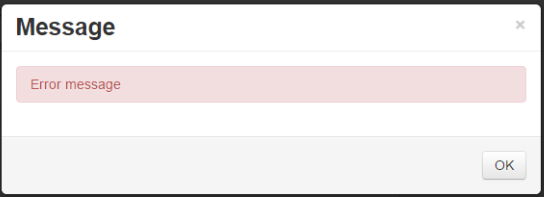
<figure><img src="https://2254578867-files.gitbook.io/~/files/v0/b/gitbook-x-prod.appspot.com/o/spaces%2FlbQndiLuyFlBYZOTuVGa%2Fuploads%2Fgit-blob-07bb79e46991e732eaf6b683fac14589e7f00b31%2Fd4error.png?alt=media" alt=""><figcaption></figcaption></figure>

<figure><img src="https://2254578867-files.gitbook.io/~/files/v0/b/gitbook-x-prod.appspot.com/o/spaces%2FlbQndiLuyFlBYZOTuVGa%2Fuploads%2Fgit-blob-77f944ccca0ed4084d0e99b83a8986ab3b622ccb%2Fd5info2.png?alt=media" alt=""><figcaption></figcaption></figure>

<figure><img src="https://2254578867-files.gitbook.io/~/files/v0/b/gitbook-x-prod.appspot.com/o/spaces%2FlbQndiLuyFlBYZOTuVGa%2Fuploads%2Fgit-blob-34db29cbf4897f1c483c4266b85648b45c29595c%2Finfomessageblue.png?alt=media" alt=""><figcaption></figcaption></figure>

<figure><img src="https://2254578867-files.gitbook.io/~/files/v0/b/gitbook-x-prod.appspot.com/o/spaces%2FlbQndiLuyFlBYZOTuVGa%2Fuploads%2Fgit-blob-239b56b884defd667ab6f22d97e9c7c5d2d58abe%2Finfomessagegreen.png?alt=media" alt=""><figcaption></figcaption></figure>

<figure><img src="https://2254578867-files.gitbook.io/~/files/v0/b/gitbook-x-prod.appspot.com/o/spaces%2FlbQndiLuyFlBYZOTuVGa%2Fuploads%2Fgit-blob-95daf9e040e4b9dd71cce3ddbaffeddec5282adb%2Finfomessageorange.png?alt=media" alt=""><figcaption></figcaption></figure>

<figure><img src="https://2254578867-files.gitbook.io/~/files/v0/b/gitbook-x-prod.appspot.com/o/spaces%2FlbQndiLuyFlBYZOTuVGa%2Fuploads%2Fgit-blob-e50ec1a6f07c6f90d9f6e14b5b6781a724ad9967%2Finfomessagered.png?alt=media" alt=""><figcaption></figcaption></figure>

This example shows the different formatting options you can use when you create feedback messages or dialogue boxes in a script.

The code snippets below are what you would use to insert each message into a script.

The first argument is always the text to display. The second argument chooses the style, and it is the part that decides whether the user sees a brief notification or a dialog box they have to dismiss.

### Notifications

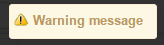
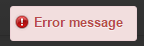
These appear in the top right of the screen and fade away on their own after a few seconds. Use them for confirmation that does not need acknowledging.

| Message type             | Code                                                      |
| ------------------------ | --------------------------------------------------------- |
| **Info Notification**    | `Service.AddMessage("Info message", "notify-info")`       |
| **Success Notification** | `Service.AddMessage("Success message", "notify-success")` |
| **Warning Notification** | `Service.AddMessage("Warning message", "notify-warning")` |
| **Error Notification**   | `Service.AddMessage("Error message", "notify-error")`     |

### Dialog boxes

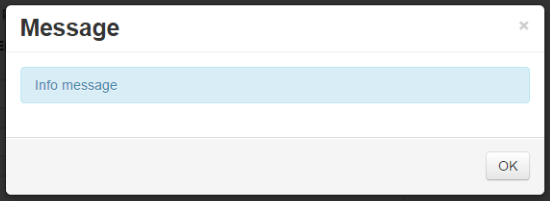
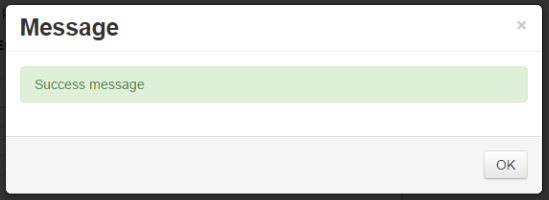
These open in the middle of the screen and stay until the user clicks OK. Use them when the user needs to read the message, such as when the script has refused the save.

| Message type | Code                                               |
| ------------ | -------------------------------------------------- |
| **Info**     | `Service.AddMessage("Info message", "info")`       |
| **Success**  | `Service.AddMessage("Success message", "success")` |
| **Warning**  | `Service.AddMessage("Warning message", "warn")`    |
| **Error**    | `Service.AddMessage("Error message", "error")`     |

Leaving the second argument out gives you an info dialog, so `Service.AddMessage("Info message")` is the shortest form.

A third argument sets the dialog's heading, which is otherwise "Message":

```javascript
Service.AddMessage("The rating cannot be negative", "error", "Invalid rating");
```

{% hint style="info" %}
Adding several dialog messages in one script stacks them into a single dialog box, and the heading is only used when there is just one message.
{% endhint %}